Help center / Registration & ticketing
Let one person register a group
Let a coordinator book several people in one go, pay once, and fix their colleagues' details later.
Government departments and companies usually send a delegation, booked by one coordinator. Group registration lets that coordinator register everyone at once, pay once, and correct a misspelled name three weeks later — without you in the middle.
Every person in the group is an ordinary attendee with their own badge, QR code, check-in, certificate and seat.
Turn it on for a ticket
There is no separate group setting. It rides on the ticket:
- Open Registration → Tickets and go to the Tickets tab.
- Edit the ticket and go to its last step.
- Tick Allow buying several at once (group purchase) and set Min per order and Max per order.
- Save the ticket.
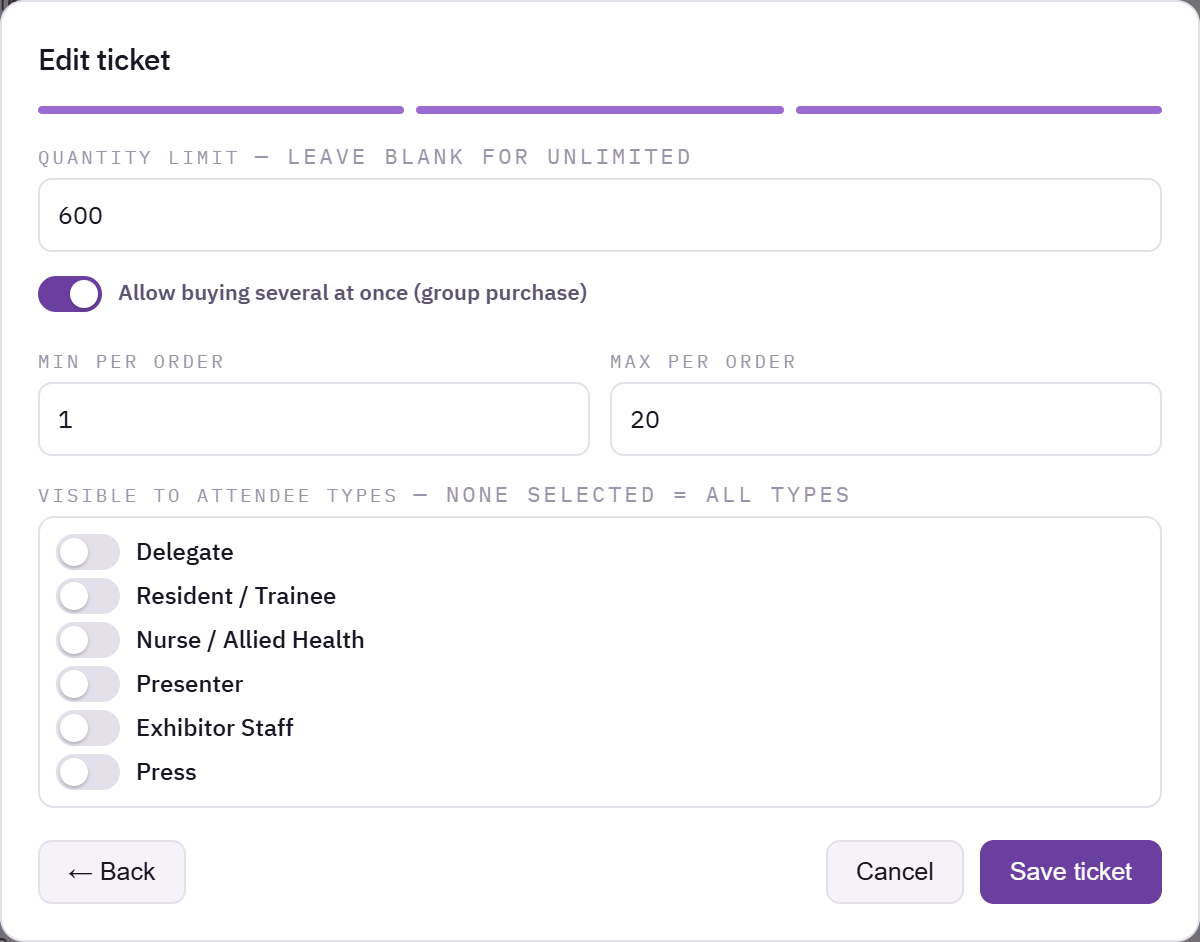
Ticket panel with the group purchase option and the minimum and maximum per order
On the registration form, that ticket now has a quantity picker. Picking more than one asks for each person's name and email. It works for free tickets too.
The two rules
Every person needs their own email address. Their confirmation, their QR code and their sign-in to the app all go by email. Twenty people sharing one inbox would be one attendee who can check in and nineteen who cannot. If two people in the group share an address, the form says which ones before anything is saved.
Tickets and people are the same number. Ten tickets means ten names. A mismatch means one of them is wrong, so the form will not let it through.
The whole group is saved together or not at all. If the 17th person's address is already registered, nobody is saved, and the coordinator fixes it and tries again. Half a delegation is not a smaller delegation.
What everyone gets
- Each person gets their own confirmation at their own address, with their own QR code.
- The coordinator also gets a link to a page listing their group, where they can correct each person's name, email and phone. Add
{{group_link}}to a custom confirmation template to include that link yourself.
The coordinator cannot change anyone's status, ticket or attendee type. Those stay with you, so a group cannot skip approval or payment.
Seeing groups in your list
The attendee list shows Booked by for group members, and the attendee CSV has a registered_by column. That is the column to use when matching one invoice against twenty badges.
Common problems
The quantity picker does not appear. The ticket does not allow group purchase, or Max per order is 1.
One person in the group never got their email. Check their address on the coordinator's page or in your attendee list, fix it, and resend their confirmation.
What happens next
more in registration & ticketing
- Create attendee typesDefine the kinds of people coming — delegate, speaker, press, student — and what each one sees.
- Add a question to your registration formPick a field type, label it, and place it on the right step.
- The 21 question typesWhat every field type is for, and which one to reach for when two look similar.
- Edit a question's label, options and validationChange the wording, build the option list, set validation rules, and restrict a question to certain steps or attendee types.