Help center / Engagement & points
Score attendees and show a leaderboard
Turn on points for what attendees actually do, set what each action is worth, and read the standing.
The leaderboard scores every confirmed attendee on things they really did at your event: arriving, going to sessions, visiting stands, meeting people, answering surveys. Attendees see the top 25 and their own place in the evenclo app.
Nothing is stored as "points". The score is worked out from records that already exist, such as a door scan, a session check-in or a confirmed meeting. That has two useful effects. Turning the leaderboard on halfway through the event scores everything that has already happened. Turning it off loses nothing.
Steps
- Open Engagement → Leaderboard in the sidebar.
- Switch on Score attendees and show a leaderboard.
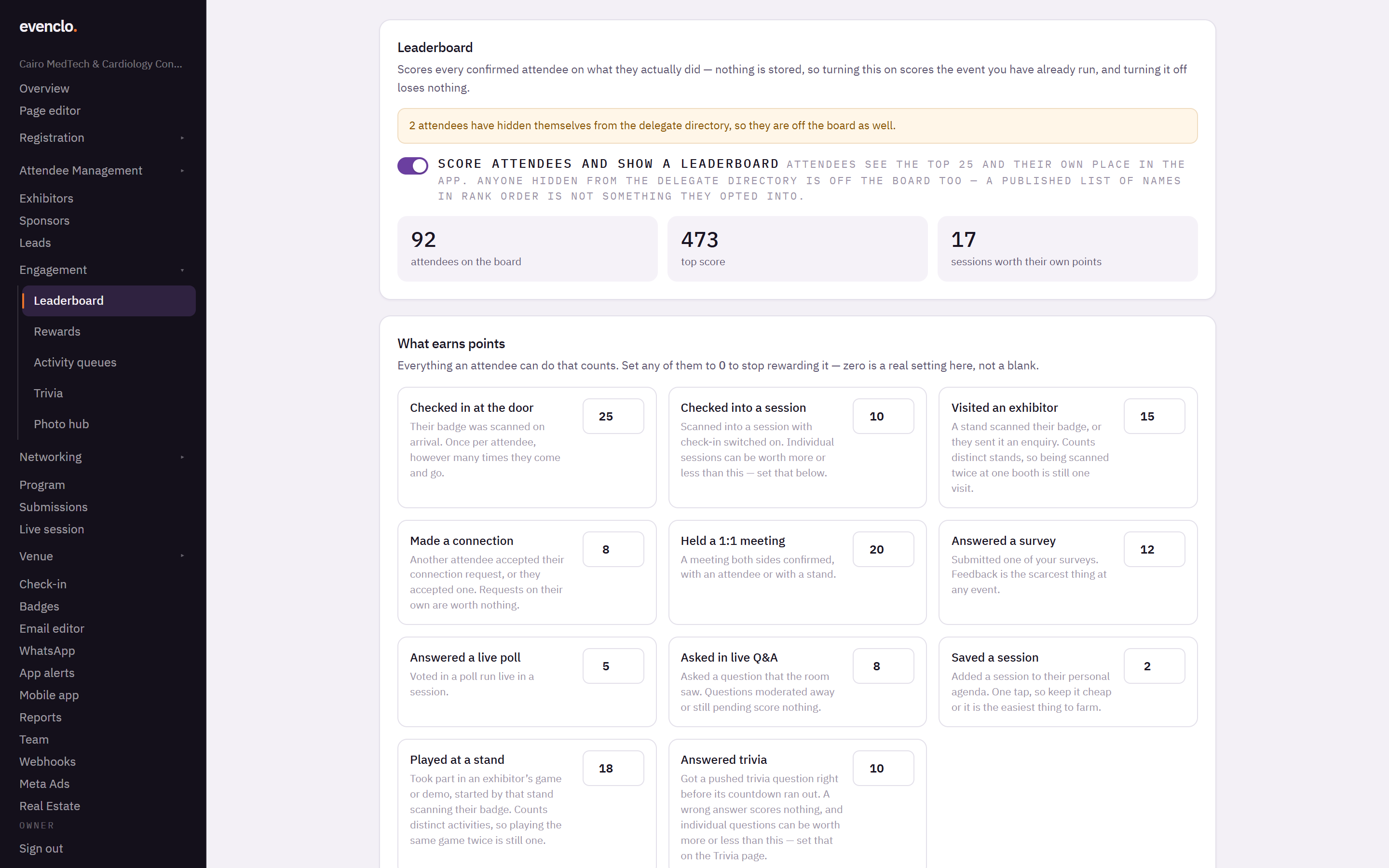
Leaderboard page with the switch on, the headline numbers and the list of actions with their points - Under What earns points, check the value next to each action. The defaults are a sensible start.
- Press Save points.
What earns points
Each action has a sentence under it explaining exactly when it counts. A few rules are worth knowing before you set values:
- Checked in at the door counts once per attendee, however often they come and go.
- Visited an exhibitor counts distinct stands. Being scanned twice at one booth is still one visit, so a queue earns nothing extra.
- Made a connection needs the other person to accept. A request on its own is worth nothing.
- Asked in live Q&A only counts questions the room saw. Questions that were hidden or are still waiting for approval score nothing.
- Saved a session is one tap, so keep it cheap or it becomes the easiest thing to farm.
- Answered trivia only counts right answers given before the countdown ended.
Set an action to 0 to stop rewarding it. Zero is a real value here, not a blank.
Weight the things you want more of. If stand traffic is what your exhibitors are paying for, make Visited an exhibitor worth noticeably more than Saved a session.
Sessions worth more
A keynote and a coffee-break roundtable are not worth the same. The Sessions worth more table lists every session with check-in switched on. Leave a session blank and it is worth whatever Checked into a session says. Type a number and that session is worth that number instead.
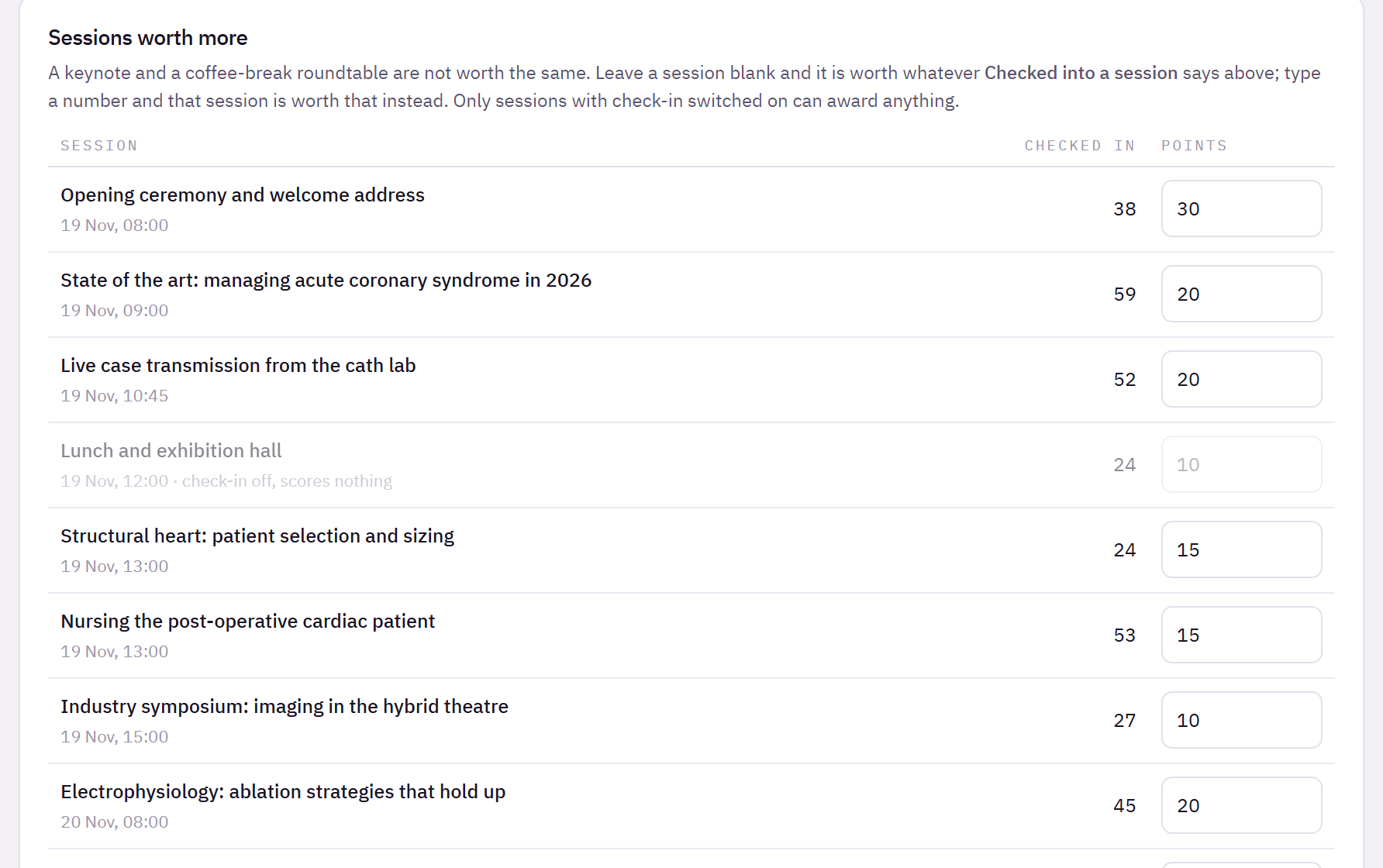
A session with check-in switched off scores nothing, and the table says so beside it.
Who is on the board
- Only confirmed attendees are scored.
- Anyone who hid themselves from the delegate directory is off the board too. A public list of names in rank order is not something they agreed to. The page tells you how many people that is.
- Ties share a place: two attendees on the same score are both shown as, say, 2nd, and the next one is 4th.
- Everyone is ranked before the top 25 is cut, so "you are 41st" is true against the whole field.
Export
Export CSV downloads the full standing with email addresses, for prize draws or follow-up. The emails are only in the export; attendees never see each other's addresses on the board.
Common problems
An attendee says their points are wrong. Check the action they expect against its rule above. The most common case is a second scan at the same stand, which is correctly one visit.
The board is empty. Nobody has done anything that scores yet, or the switch is off. The headline numbers at the top show how many attendees are on the board.
A session shows "check-in off, scores nothing". Turn on session check-in for it on the Program page.
What happens next
more in engagement & points
- Let attendees spend points on rewardsPut perks on the shelf, set what they cost and how many there are, and see who has swapped what.
- Run games and demos at standsGive a stand's game or demo a queue attendees join by scanning, and count who actually took part.
- Push a trivia question to the roomSend a question with three answers and a countdown to every phone, and give points for the right answer.
- Run the photo wallLet attendees post photos and short clips inside the app, decide who may post, and moderate what appears.