Help center / Abstracts & submissions
Open a call for abstracts or cases
Create a call, pick a form preset, set the deadline, blinding, fee and who may submit, and publish the form.
A call is one stream of submissions: research abstracts, clinical cases, a junior award, a named prize. Each call has its own form, deadline, scoring and blinding, and a congress often runs several side by side.
Create a call
- Open Submissions in the sidebar. The Calls tab lists your calls.
- Pick a starting form from the list next to + New call:- Clinical case — ESC / EHRA (five sections, 2,000 characters each)- Clinical case — Introduction / Presentation / Management / Discussion / Conclusions- Research abstract — IMRaD (300 words in total)- Free-form (a single body)
- Press + New call, then Edit on the new call to set it up.
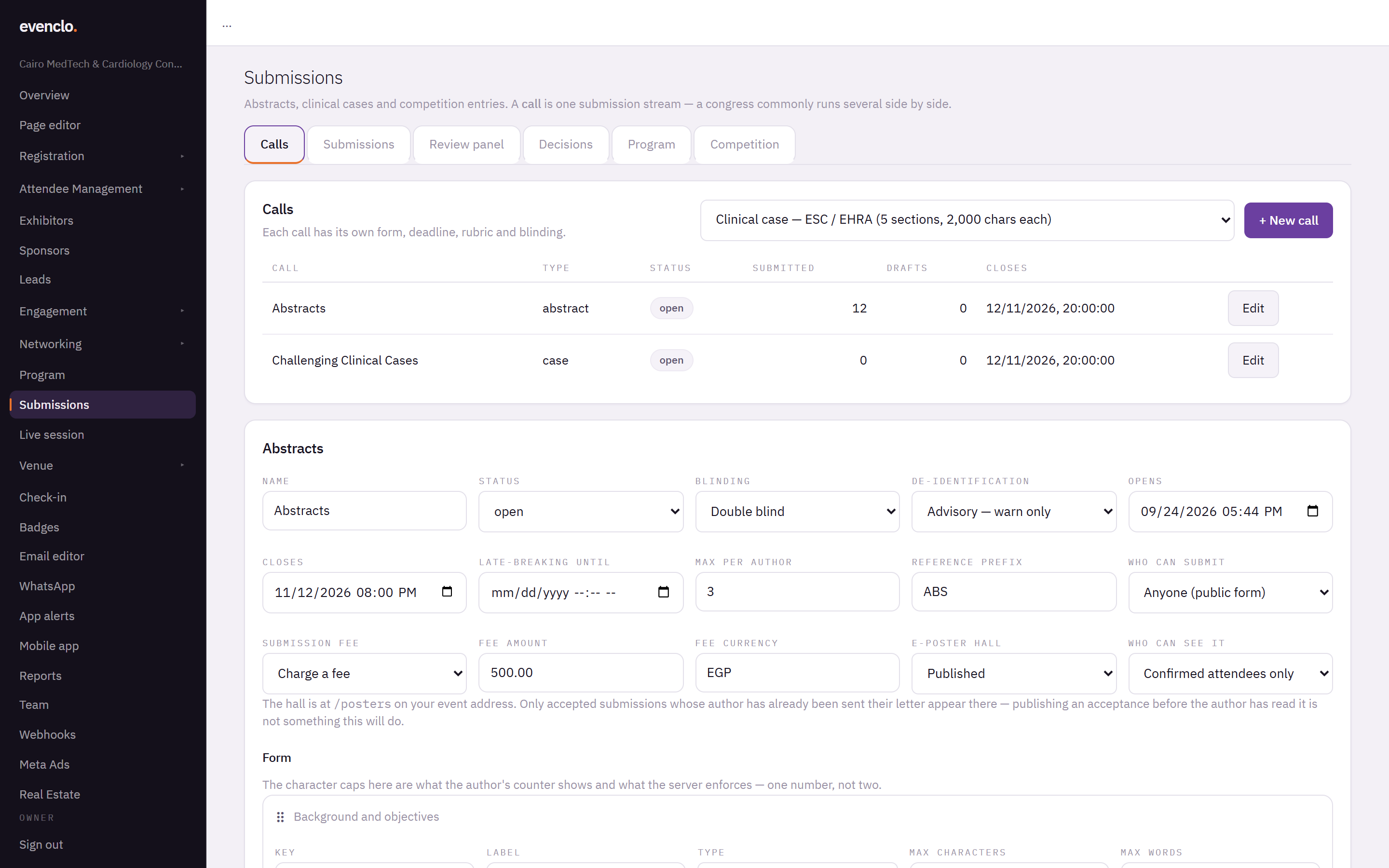
Calls tab with two open calls and the call editor showing deadlines, blinding, fee and form fields
The settings
- Status —
draftwhile you prepare it,opento take submissions, thenclosed,in_review,decidedandpublishedas the call moves on. - Blinding — Double blind hides authors from reviewers and reviewers from authors. Single blind hides reviewers only. Open review hides nothing.
- De-identification — evenclo scans each submission for names of hospitals, universities and cities that could identify the authors, in English and Arabic. Advisory warns the author. Blocking makes them acknowledge the warning before submitting. The scan helps; it does not guarantee anything.
- Opens, Closes and Late-breaking until — times are the venue's clock.
- Max per author — how many submissions one person may make.
- Reference prefix — submissions are numbered with it, such as
ABS-014. - Who can submit — see below.
- Submission fee and Fee amount — see below.
- E-poster hall — publishes accepted posters at
/posters. See Decide and notify authors.
The form
Under Form, each field has a Label, a Type, and optional Max characters or Max words. The limit you set is exactly what the author's counter shows and what evenclo enforces. Characters are counted the way a reader sees them, so Arabic text with diacritics is not over-counted.
Drag fields to reorder them. The order is the section order in the author's form, in the reviewer's screen and in the book of abstracts. Press Save call.
Who can submit
- Registered delegates only — authors must be registered for the event first. This is the default.
- Anyone (public form) — publishes the call's own form at
/submit/followed by the call's address. Anyone can identify themselves, submit and pay in one go. Add the Abstract Submission section to a page in the page editor to show the form on your event site.
An author who submits through the public form with an address that already has an account is emailed a sign-in link rather than signed in, so nobody can reach a colleague's drafts by typing their email.
Fees
With Charge a fee, the fee falls due when the author submits — never before. A payment outage on deadline night does not cost you submissions; an unpaid submission is simply marked as unpaid for your team to chase. You can mark a fee as paid by hand when it arrives by bank transfer.
How authors work
Authors sign in with an emailed link or a 6-digit code — there is no password. They can save a draft, come back, attach figures, and submit before the deadline. Each submission keeps every version.
Common problems
Authors cannot see the form. The call is still draft, or the closing time has passed.
An author says the counter disagrees with the limit. It does not: the counter and the check use the same rule. Ask them to remove list bullets — prose-only fields refuse them.
Scoring criteria are missing. The scoring rubric and the call's tracks are set up for you by evenclo support. Contact us with the criteria and their weights.
What happens next
more in abstracts & submissions
- Review submissionsAdd reviewers, check for conflicts, let the allocator assign submissions, follow progress and read the scores.
- Decide and notify authorsRecord the committee's decisions, send the letters when you are ready, run a second round for revisions, and publish the posters and the book of abstracts.
- Put accepted work on the programmeTurn every accepted submission into a session and a speaker in one press, and make sure every presenter registers.
- Run a judged case competitionSet a running order, let judges score each presentation from their phones with a shared clock, and rank the prize winners.